Kostenloser Download einer Schriftfamilie
Neura Display
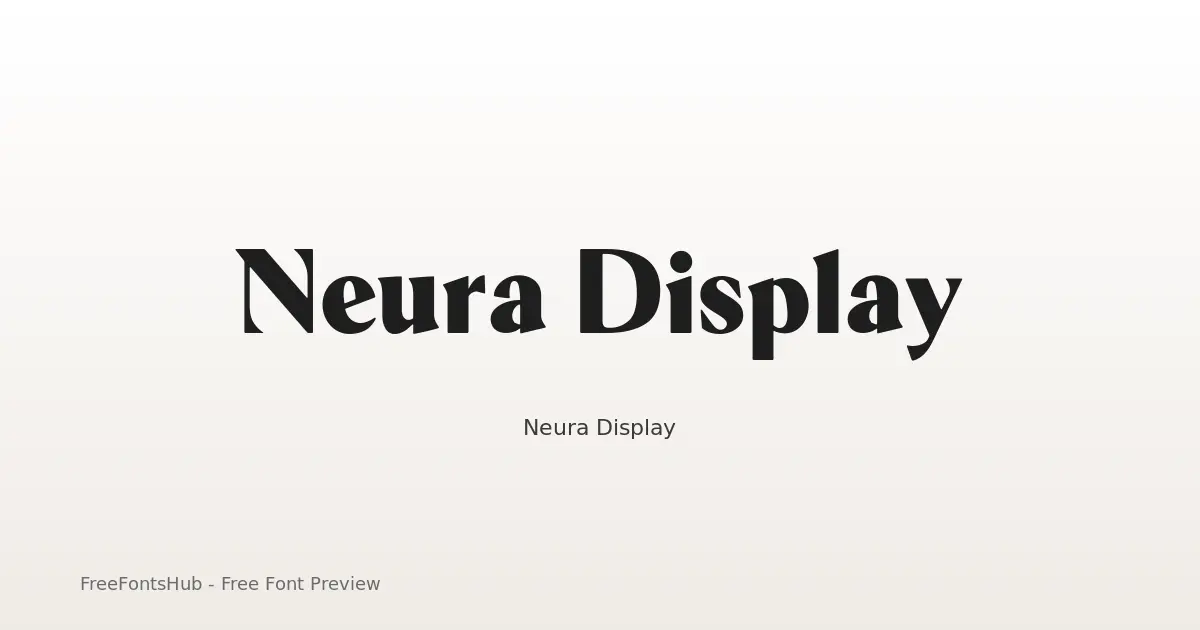
Neura Display is a high-contrast hybrid typeface designed for a futuristic, editorial aesthetic. By stripping traditional serif "feet" (nails and foots) while retaining elegant half-serif terminals and rounded corners, it bridges the gap between scientific precision and luxury fashion. It is a sans-serif font at its core, but these unique terminal treatments provide a "serif-ish" vibe that makes it stand out in tech, AI, and high-end branding contexts.
Über die Schrift Neura Display
Neura Display is a high-contrast hybrid typeface designed for a futuristic, editorial aesthetic. By stripping traditional serif "feet" (nails and foots) while retaining elegant half-serif terminals and rounded corners, it bridges the gap between scientific precision and luxury fashion. It is a sans-serif font at its core, but these unique terminal treatments provide a "serif-ish" vibe that makes it stand out in tech, AI, and high-end branding contexts.
Schnitte dieser Familie: Black, Bold, ExtraBold, ExtraLight, Light, Medium +3 weitere. Prüfen Sie jeden Schnitt auf dieser Seite in der Vorschau und laden Sie dann das vollständige Neura Display-Paket herunter.
Verfügbare Schnitte
Jeden Schnitt in der Vorschau ansehenBlack
Bold
ExtraBold
ExtraLight
Light
Medium
Regular
SemiBold
Thin


← → für Schnitte, + − zum Zoomen, Scrollen zum Zoomen, Esc zum Schließen
So verwenden Sie Neura Display
- Laden Sie die Neura Display-ZIP herunter (9 Schnitte, TTF + readme).
- Entpacken Sie die Datei und installieren Sie die Desktop-Schriften (TTF/OTF) unter Windows, macOS oder Linux.
- Für das Web bevorzugen Sie WOFF2/WOFF, sofern enthalten; behalten Sie TTF/OTF als Fallback.
- Beachten Sie SIL Open Font License (OFL 1.1), bevor Sie kommerziell veröffentlichen.
Lizenz und Namensnennung
Lizenz: SIL Open Font License (OFL 1.1)
Prüfen Sie stets die enthaltene readme.txt und die Originallizenz vor kommerzieller Nutzung. FreeFontsHub stellt Verpackung und Auffindbarkeit bereit; die Rechte bleiben beim Designer bzw. der Foundry.
Einbettungserlaubnis: installable
Häufig gestellte Fragen
Ist Neura Display kostenlos?
Ja, Sie können Neura Display auf dieser Seite kostenlos herunterladen. Beachten Sie die Lizenz für die zulässige Nutzung.
Was ist in der ZIP enthalten?
Die ZIP enthält alle verfügbaren Schnittdateien für Neura Display (TTF) sowie eine Readme mit Angaben zu Designer, Foundry und Lizenz.
Wer hat Neura Display erstellt?
Gestaltet von Yasir Ekinci.
Darf ich sie kommerziell nutzen?
Die kommerzielle Nutzung von Neura Display hängt von SIL Open Font License (OFL 1.1) ab. Prüfen Sie die Lizenz auf dieser Seite und in der ZIP vor kommerziellen Projekten.